

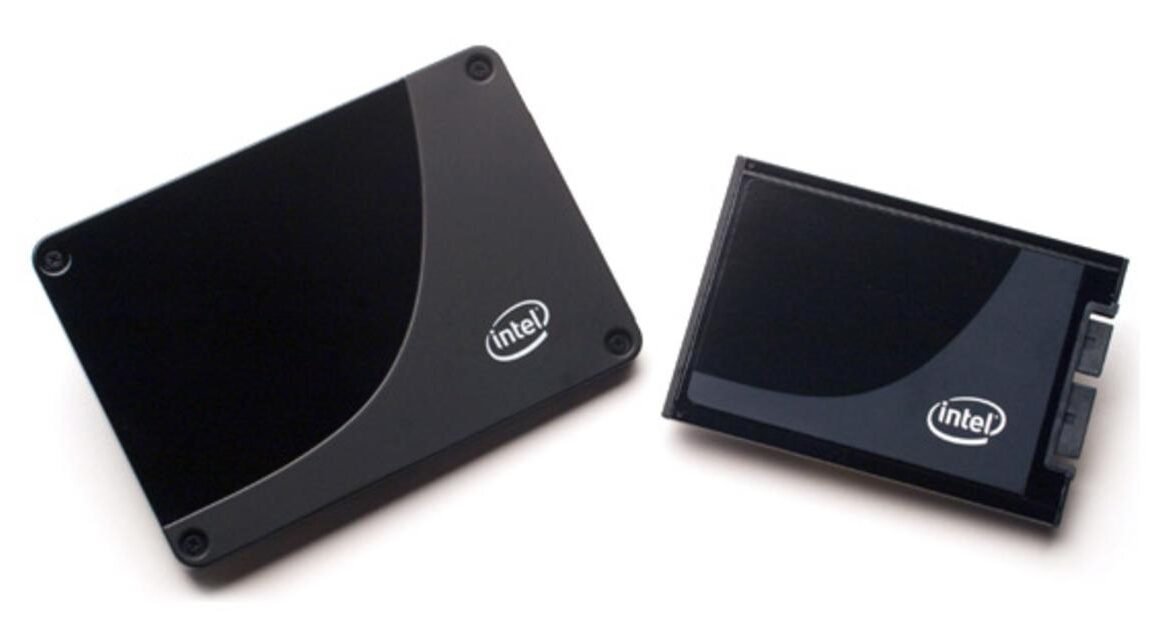
Why SSDs Are a Game-Changer for Business IT: A Guide
In the fast-paced and ever-evolving world of business, technology plays a crucial role in driving efficiency, productivity, and growth. When it comes to storage solutions, businesses increasingly need systems that are not only fast but also reliable and scalable. Enter the Solid State Drive (SSD)—a revolutionary storage device that outperforms traditional hard drives in nearly every category. In this guide, we’ll explore why SSDs are becoming the go-to choice for business IT and how Server Tech Central can help you choose the best SSD for your organization’s needs.
1. What is an SSD (Solid State Drive)?
A Solid State Drive (SSD) is a storage device that uses flash memory, rather than mechanical parts like the Hard Disk Drive (HDD), to store data. This fundamental difference in technology gives SSDs an edge over HDDs in performance, durability, and efficiency. The absence of moving parts allows SSDs to operate faster, use less power, and last longer, making them an ideal storage solution for businesses that need reliability and speed.
For businesses, SSDs translate to faster system performance, reduced downtime, and greater operational efficiency. Whether you are managing large databases, running complex applications, or hosting virtual environments, upgrading to an SSD can significantly improve your IT infrastructure.
2. SSD vs HDD: Why SSD Wins for Business
When it comes to choosing between SSD vs HDD, businesses are discovering the many advantages of SSDs:
- Speed: SSDs offer exceptional speed compared to HDDs. They drastically reduce boot times, improve file load speeds, and ensure faster access to applications and data, all of which can improve employee productivity.
- Durability: Unlike HDDs, SSDs have no moving parts, making them far less susceptible to physical damage. This increased durability ensures your data is safe, even in high-impact environments.
- Energy Efficiency: SSDs consume significantly less power than HDDs, which can help lower energy costs for your business. This is particularly beneficial for companies looking to optimize their overall operational expenses.
- Reduced Boot and Load Times: Faster boot-up times and quicker access to data and applications mean less time waiting around and more time getting work done. This can lead to a more seamless workflow for your team.
- Real-World Applications: Whether your business is running a data center, using workstations for intensive applications, or deploying laptops for remote employees, SSD storage solutions provide the speed and reliability required for all these environments.
3. Types of SSDs Explained
Not all Solid State Drives are the same. Depending on your needs, different types of SSDs may be more appropriate for your business:
- SATA SSDs: These are the most common SSDs, offering a good balance between price and performance. While they are slower than other options, they are perfect for general-purpose storage in most business applications.
- NVMe SSDs: These drives are much faster than SATA SSDs and are ideal for businesses that need high-speed storage for tasks like video editing, data processing, or running virtualized environments.
- M.2 and PCIe SSDs: Both of these types offer high performance, particularly in systems that demand exceptional speed and efficiency. These SSDs are ideal for businesses that need the best in terms of data throughput and low latency.
- Server-grade SSDs: For enterprise applications, server-grade SSDs provide the ultimate in performance and reliability. These drives are built to handle heavy workloads and are designed for 24/7 operation, making them the go-to option for data centers and high-performance servers.
Choosing the right SSD depends on your business’s needs and the performance level required for your operations.
4. Key Benefits of Using SSDs in Business IT
Switching to SSDs offers numerous advantages that can enhance your business IT infrastructure:
- Improved System Performance: By upgrading to SSDs, businesses can experience a noticeable improvement in system speed. From faster boot times to quicker file access and program loading, SSDs help eliminate bottlenecks and enhance overall productivity.
- Better Data Reliability and Security: SSDs are more resistant to physical shock and failure, which can help protect your critical data. Their reliability makes them a preferred choice for businesses that rely on secure and fast data storage.
- Faster Data Access and Processing: With SSDs, businesses can process large files and data-intensive applications much faster. This allows employees to access and manipulate data in real-time, improving decision-making and project timelines.
- Scalability for Growing Businesses: As businesses grow, so do their data storage needs. SSDs provide the scalability required to support larger and more complex datasets without compromising on performance.
5. How to Choose the Best Solid State Drive for Your Business
Selecting the right SSD for your business requires considering several factors:
- Storage Capacity: The amount of storage you need will depend on the scale of your operations. Small businesses may only need a few hundred gigabytes, while larger businesses might require multiple terabytes.
- Read/Write Speeds: If your business relies on fast data access and processing, look for SSDs with high read/write speeds. NVMe drives, for example, offer superior speeds compared to SATA SSDs.
- Endurance and TBW Rating: The endurance of an SSD is measured by its TBW (Terabytes Written) rating. If your business requires constant data writing, consider an SSD with a higher TBW rating for longevity.
- System Compatibility: Make sure that the SSD you choose is compatible with your system’s interface. Check whether your laptop, server, or desktop supports the type of SSD you plan to install.
- Future-Proofing with PCIe/NVMe Options: If you want your storage solution to last, consider future-proofing your business with PCIe or NVMe SSDs, which are designed to support the most demanding applications.
6. Where to Buy SSDs Online: Why Server Tech Central is the Right Choice
When it’s time to buy SSD for your business, Server Tech Central is your trusted online source for top-tier IT hardware. Here’s why we’re the best choice:
- Quality SSD Brands and Models: We offer a wide variety of solid state drive online, featuring industry-leading brands like Samsung, Kingston, and Crucial. Whether you’re looking for a budget-friendly option or a high-performance solution, we have it all.
- Competitive Pricing: Whether you’re purchasing a single SSD or buying in bulk, Server Tech Central offers competitive pricing that fits your business’s budget.
- Expert Support: Our knowledgeable team is always available to help you choose the right SSD based on your needs and requirements, ensuring you make the best purchase decision.
- Convenient Ordering and Shipping: With a seamless online shopping experience and efficient shipping, Server Tech Central makes buying SSDs easy and stress-free.
7. Installation Tips and Best Practices
Installing your new SSD doesn’t need to be difficult. Here are some key tips to ensure a smooth installation:
- Basic Installation Overview: Whether you are upgrading a laptop or a server, SSD installation is relatively straightforward. Just make sure your system is compatible with your chosen SSD and follow the instructions provided by the manufacturer.
- Data Migration Tips: Use reliable migration software to transfer your files from your old drive to your new SSD. Popular tools like Acronis True Image or Clonezilla can help you clone your system drive quickly and safely.
- Tools and Software Suggestions: For a smooth SSD setup, consider using disk management tools like Diskpart (for Windows) or Disk Utility (for Mac).
- Consult a Professional if Needed: If you’re unsure about installation or data migration, consider consulting a tech professional who can help ensure everything is set up correctly.
8. Frequently Asked Questions (FAQ)
- What is the difference between SSD and HDD? SSDs are faster, more durable, and consume less power than traditional HDDs, making them the better choice for modern IT setups.
- How long does an SSD last? On average, SSDs can last between 5 to 10 years, depending on usage. SSDs with higher endurance ratings tend to last longer.
- Can SSDs fail? What are signs of failure? While SSDs are generally more reliable than HDDs, they can still fail. Signs of failure include system crashes, slow performance, and data access issues.
- How much SSD storage do I need for my business? Storage needs vary depending on your business size and data requirements. Small businesses may need 256GB to 512GB, while larger enterprises may require multiple terabytes of storage.
Conclusion
Upgrading to SSDs is a smart investment for any business looking to improve efficiency, reliability, and data security. With their impressive speed and durability, SSDs are the future of business IT. Whether you are looking to buy SSD for a single workstation or your entire organization, Server Tech Central offers a wide range of IT hardware solutions online, top-tier customer service, and expert advice to help you make the right choice.